
Knowledge Base
How to add a sub-advertiser in FlamyAds?
Step 1:
- Go to User Management from the left navigation and select Create New User
- Now, in the Account Type, add Sub-advertiser (Image 1)
- Add the name of the agency for whom the sub-advertiser is required
- Status is to be kept Active by default, unless any other conditions are stated
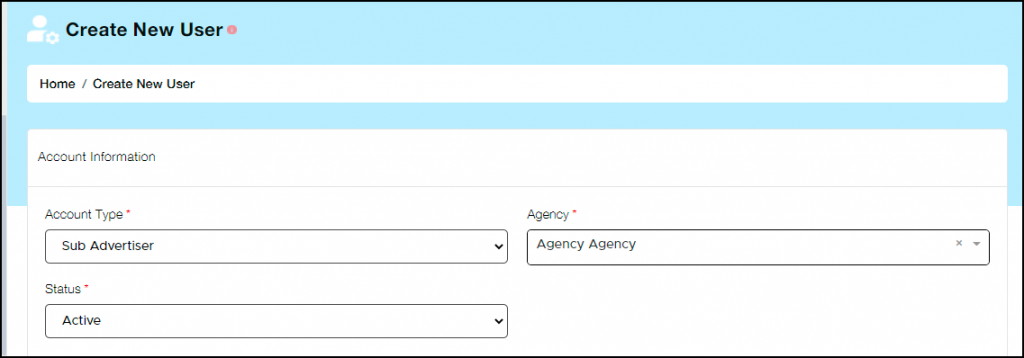
Image 1
Step 2:
- Add email address and password (Image 2)
- Ideally, the client will provide both email address as well as password
- You can however make a password and provide it to the client which they can change as and when required

Image 2
Step 3:
- Enter the First and Last name of the sub-advertiser (Image 3)
- Next, add their Business name and URL
- Now enter their messenger ID and Phone number followed by geographical information
- After entering all the required details, enter submit
- Please note, in the list of users the Agency’s name will be visible in Account Manager column for whom the sub-advertiser is created
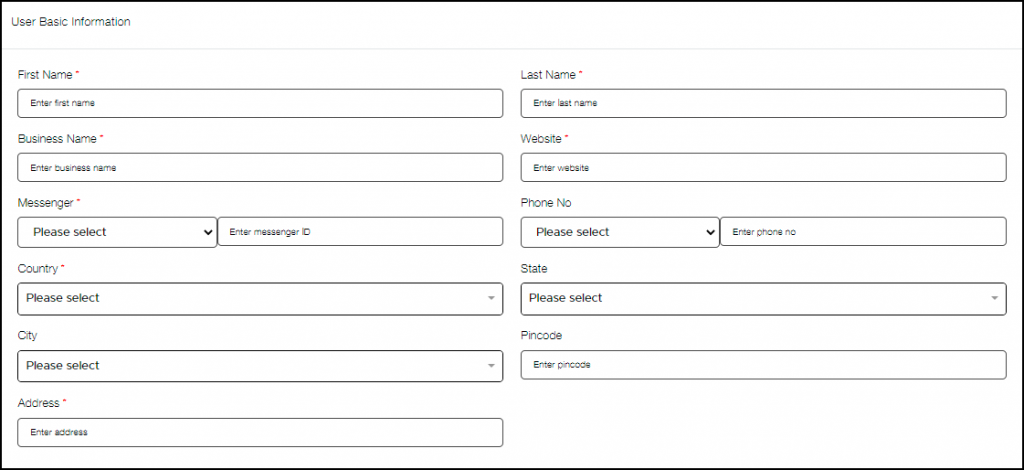
Image 3